01 / Hidden copies
Where else did the data go?
Exports and staging files leave sensitive information outside the systems your team expects.
Discover the copies Classify data in connected sources and inspect the affected assets.
Data Security Posture Management
Discover where sensitive data lives, understand its exposure and movement, and give your security team the evidence to review and report.
Discovery → Exposure & lineage → Review → Reporting
Pelestra in action
Follow a customer export through sensitive data discovery, lineage, finding review, and reporting. See the connected workflow in 51 seconds.
The problem
A customer database becomes an export. An export lands in a bucket. Another copy enters a shared folder. Your team needs to know where sensitive information ended up, how it is exposed, and what to investigate first.
Pelestra brings discovery, exposure context, lineage, and review together so those questions have a shared starting point.
Exports and staging files leave sensitive information outside the systems your team expects.
Discover the copies Classify data in connected sources and inspect the affected assets.
Connections between systems obscure where data travels and which regions are involved.
Follow the evidence Inspect lineage, regions, and policy results to guide an investigation.
A list of detected identifiers leaves reviewers to work out the significance of every finding.
Record the judgment Review the context, explain the decision, and share it in a report.
Different sources.
One discovery workflow.
The solution
Five steps to understand what was found, inspect the context, and keep a record of your team’s decision.
Define the systems and locations your team wants to investigate.
One starting point for discovery.
Data lineage
A line between two systems should tell you something. See which relationships are observed and which are declared before drawing a conclusion.
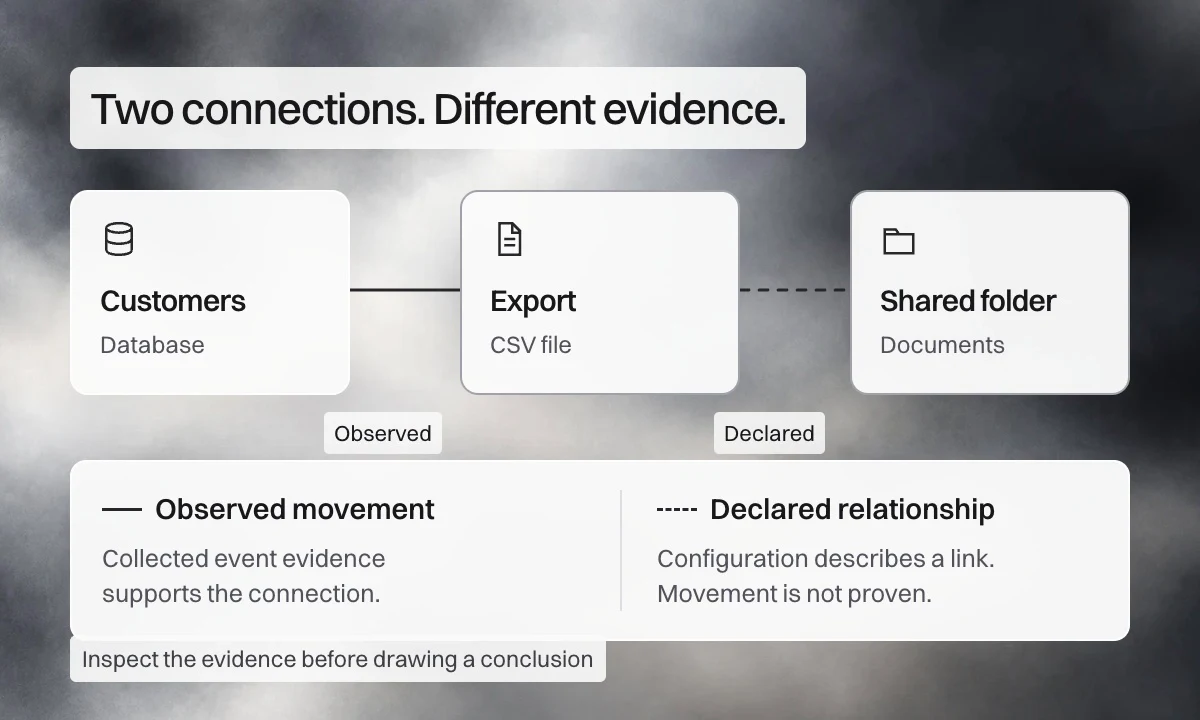
Read the relationship
Observed movement Collected event evidence supports the connection.
Declared relationship Configuration describes a link. It does not prove that data moved.
A movement supported by collected event evidence. Inspect the source and destination behind the connection.
Sample relationships. Select a connection to see its evidence type.
A concrete example
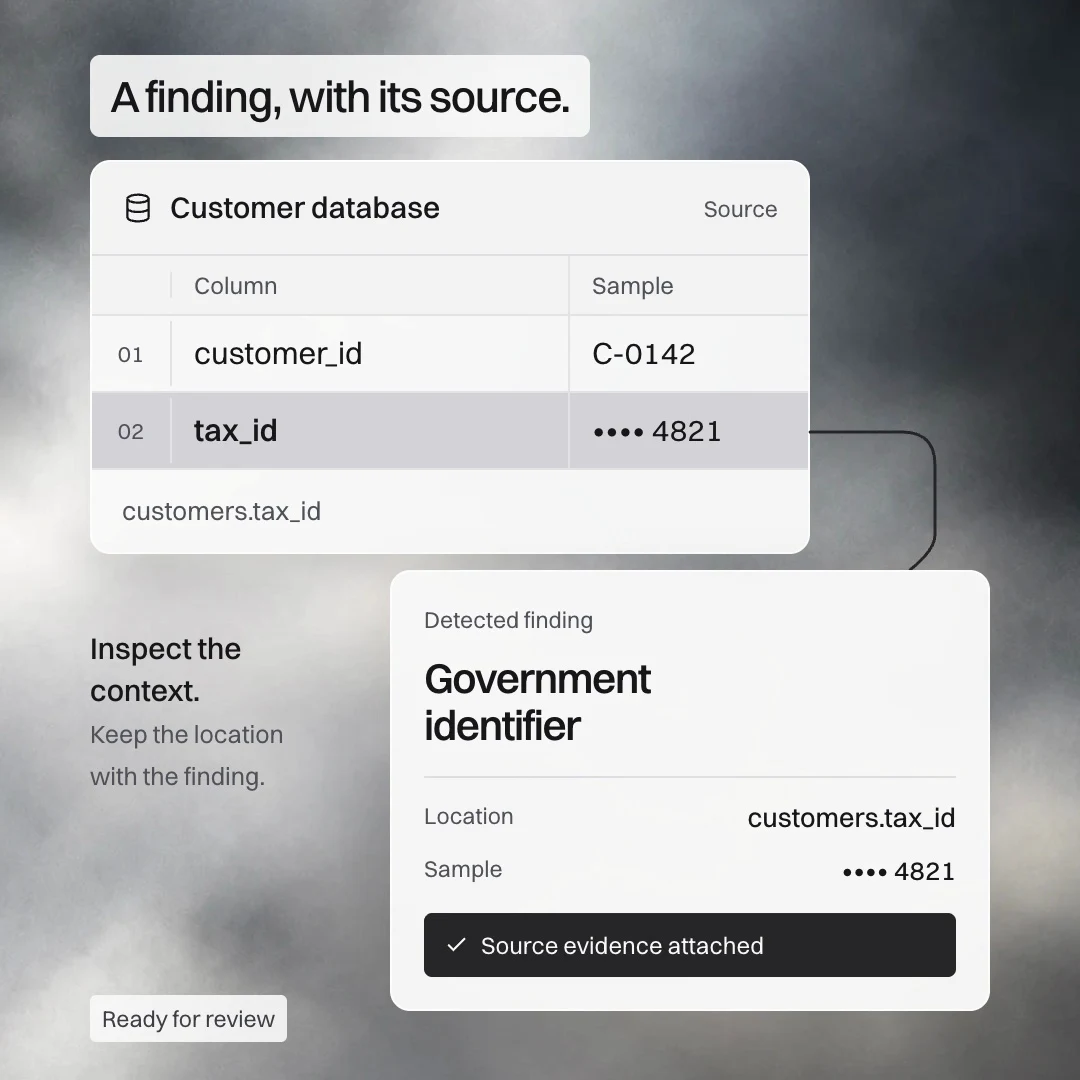
Suppose a customer export is flagged for external access. Your team needs to understand the finding and how the export relates to its source.
Inspect the identifier’s redacted sample and location in customers.tax_id.
Review available exposure details for customer-contact.csv and the evidence behind its connection to the database.
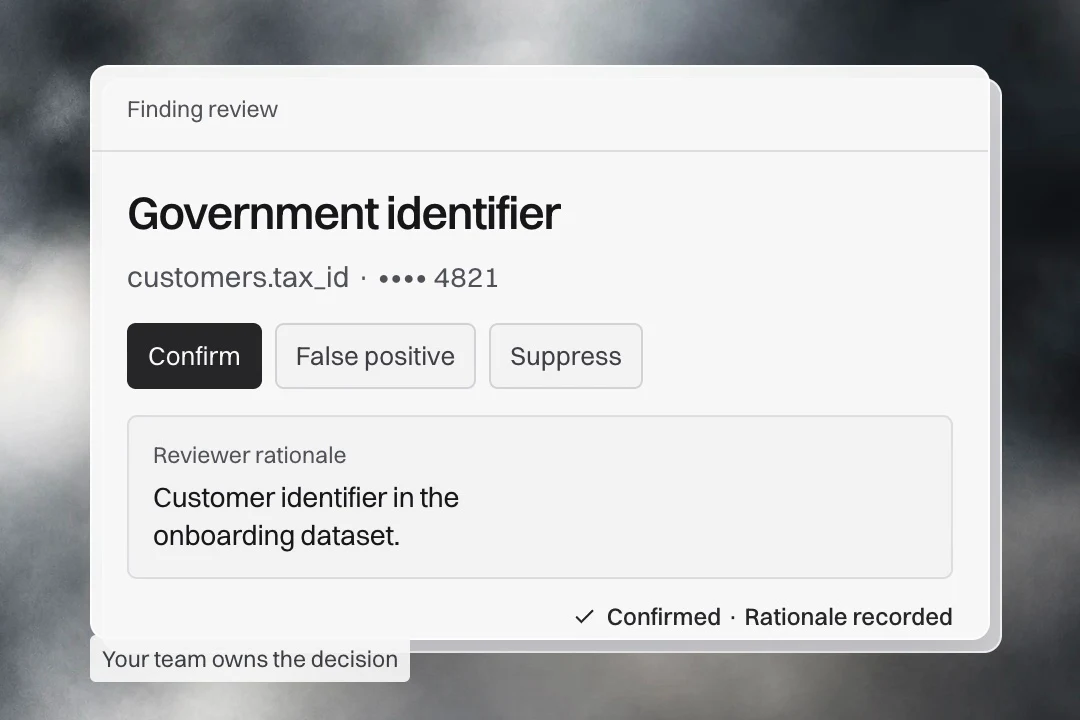
Confirm the identifier or mark it as a false positive, with a rationale explaining the judgment.
Use discovery, exposure, and lineage reports to support the follow-up discussion with the responsible team.
The outcome A reviewed finding, an exposure to investigate, and evidence your team can explain.
Confirming a finding records a review decision; access changes are a separate follow-up.
Why Pelestra
Bring location, exposure, evidence, and review status together. Help your security and governance teams focus investigations and explain their findings to leadership.
Classification, location, redacted sample, and confidence give reviewers a starting point. A decision and rationale explain what your team concluded.
Review available access, severity, owner, and region information. Inspect connections with their evidence and policy result.
Track asset states, rows scanned, findings, and errors. Inspect checkpoints and use available pause, resume, and retry controls.
Reporting
Give leadership an overview and reviewers the detail behind it. Choose a report that fits the question your team needs to answer.
Executive overview
Bring finding severity, discovery coverage, exposure, and lineage into a discussion of priorities.
| Area | What to review |
|---|---|
| Discovery | Connected sources & affected assets |
| Exposure | Available access classifications |
| Lineage | Connections & region flows |
Give leadership the overview, with detail available for further review.
Built around your boundaries
Discuss an on-premise or private deployment that fits your data sources, access requirements, and review process.
Discuss your environmentSource access and deployment boundaries agreed for your evaluation.
Review your systems, connector availability, and permissions for an evaluation.
Discuss private or on-premise requirements and operational limits.
Discuss user permissions, reporting needs, and configurable product branding.
Perspectives
Good questions
Here are a few things to know before we talk.
Pelestra brings sensitive data discovery, finding review, and data lineage into a shared workflow. Your team can inspect where a finding was detected, review its context, and record a decision.
The product is designed around connectors for databases, object storage, and files. In your demo, we will review the specific systems, connector availability, and access requirements for your environment.
Reviewers can confirm a finding, mark it as a false positive, or suppress it, and record a rationale. A detected finding is a starting point for review, rather than an automatic compliance conclusion.
The evidence type matters. An observed movement is supported by collected event evidence. A declared dependency describes a relationship but does not, by itself, prove that data moved.
Yes. We can review an on-premise or private-environment deployment around your sources, permissions, and operational requirements. The demo is a good place to agree the boundaries of an evaluation.
Reports bring together executive summaries, discovery coverage, exposure, and lineage evidence. Export CSV or Markdown, or use the print-ready view for a PDF. Available report and export actions depend on your permissions. Reports support your assessment; they do not certify compliance.
Scan monitoring shows asset states, rows scanned, findings, and reported errors. Your team can inspect progress and use the available scan controls. We will agree scan scope and operational limits for your evaluation.
Product branding can be configured with a name, logo, and primary and secondary colors. Report headers and exports use the configured branding. We can review the setup you need during a demo.
Let’s make it concrete
Bring your discovery questions. We’ll walk through a finding, its context, and how Pelestra could fit your team’s process.
30 minutes · Your environment · A practical next step